Software Architecture Explained: A Simple Guide to Patterns, Roles, and Tech Debt
A visual breakdown of software architecture showing how different development roles, modern patterns, and technical debt interact across the frontend,...
A visual breakdown of software architecture showing how different development roles, modern patterns, and technical debt interact across the frontend,...
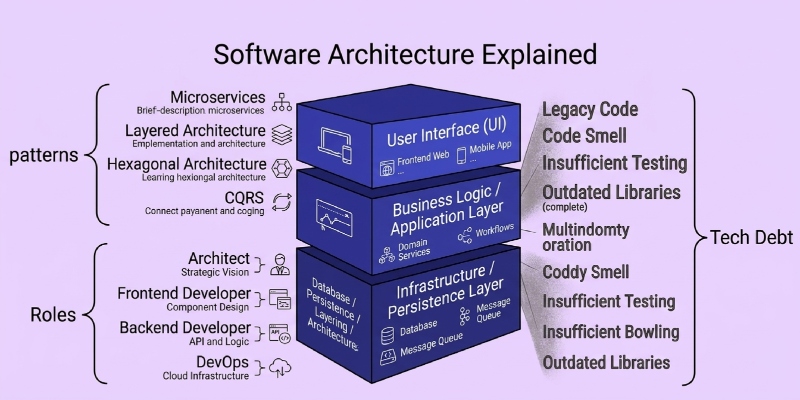
Have you ever used an app that constantly crashes, or a website that takes forever to load a simple page?
Usually, when this happens, people blame the programmers. They assume the code was just written poorly.
But most of the time, the real problem is much deeper. The problem is not the code itself, but the invisible blueprint that the code was built upon.
Think of building software like building a giant skyscraper. If the architect designs a weak foundation, it does not matter how good the construction workers are. The building will eventually crack under its own weight.
In the digital world, this is exactly why software architecture is so important.
As a working software developer in Dubai, I see this exact scenario play out all the time. A local startup or an established business will spend a fortune on marketing and flashy website designs. But underneath that pretty exterior, the hidden code structure is a tangled, disorganized mess.
When a business grows, its software needs to handle more users, more data, and much more complex tasks. If the underlying structure is weak, adding new features becomes incredibly slow, buggy, and expensive.
You do not need to be a programmer to understand how this works. Once you learn the basic rules of software architecture, you will finally understand why some tech teams move incredibly fast, while others seem permanently stuck fixing broken code.
Here is a simple, high-level guide to the hidden world of software architecture, the roles of the people who build it, and how to manage the hidden costs of technology.
One of the most confusing things in the tech industry is job titles. If you read the Wikipedia page for “Software Architecture,” you will notice a lot of overlapping terms. Because businesses often mix up these titles, it leads to confusion, overlapping duties, and wasted money.
Let’s break down the clear differences between the three main types of tech architects I work with every day.
1. The Software Architect
The Software Architect is the hands-on builder.
They focus strictly on one specific application or software project. Their job is to decide what programming languages to use, how the code should be organized, and how the database will safely store information. If you are building a brand-new food delivery mobile app, the Software Architect draws the exact technical blueprint for that specific app. They work directly with developers to make sure the code follows the plan.
2. The Solution Architect
The Solution Architect looks at a slightly bigger picture.
Instead of looking at just one app, they look at a specific business problem and figure out how multiple different software tools can work together to solve it. For example, if a large retail company in Dubai wants to start selling products online, the Solution Architect figures out how the new eCommerce website will connect to the company’s existing warehouse software, accounting software, and shipping software. They are the bridge between a business problem and a technical solution.
3. The Enterprise Architect
The Enterprise Architect looks at the entire company from a bird’s-eye view.
They do not worry about individual lines of code or how a single app works. Instead, they look at the company’s long-term business goals and ensure all technology aligns with those goals. They decide what software the whole company should buy, what old, outdated systems should be shut down, and how to keep everything legally compliant and secure. They are the ultimate bridge between the CEO’s grand vision and the IT department’s daily operations.
Have you ever taken over a project, looked at a weird line of code, and asked, “Why on earth did the last developer build it this way?”
In the past, teams would write massive, 100-page instruction manuals on corporate wikis (like Confluence or SharePoint). Nobody ever read them. When the software naturally changed over time, the wiki was never updated. Eventually, the wiki became completely useless, full of outdated information.
Today, modern teams use something much smarter called an ADR (Architecture Decision Record).
An ADR is a short, simple text document that explains a single, major technical choice. Instead of hiding these decisions in a forgotten corporate wiki, developers write them in simple Markdown format (plain text) and save them directly inside the code repository. This way, the blueprint lives right next to the code itself.
A Simple ADR Template
Writing an effective ADR is easy. You do not need complex corporate jargon. Every good ADR follows this basic, five-step structure:
Tools for Managing ADRs
Architects use lightweight tools to manage these records. Because they are plain text, they load instantly and can be read by anyone. Many teams use simple command-line tools like adr-tools to automatically generate these text templates. Other teams use visual tools like Log4brains to turn those plain text files into a beautiful, highly searchable knowledge base that the whole company can read.
When a developer or an architect sits down to design a system, they have to choose a “pattern.” A pattern is just a proven, historical way of organizing software.
As a website and software developer, I have to explain these patterns to clients so they understand what they are paying for. Here is a high-level look at the most common patterns used today.
Monolith vs. Microservices
Imagine you are building a traditional Swiss Army Knife. It has a knife, a screwdriver, a file, and scissors all physically bolted together into one handle.
This is a Monolithic Architecture. The entire software application is built as one giant, tightly connected block of code.
To fix this problem, large companies use Microservices.
Instead of a Swiss Army Knife, imagine a professional mechanic’s toolbox. You have a separate, independent hammer, a separate wrench, and a separate screwdriver.
In software, this means breaking the website into tiny, completely independent pieces. One piece handles user passwords, another piece handles the shopping cart, and another piece sends out email receipts.
Think about a busy, high-end restaurant kitchen.
When a waiter takes your order, they do not walk to the chef, wait 30 minutes for the food to be cooked, and then bring it to you. That would be terribly slow. Instead, they pin the order ticket to a board (an event) and immediately walk away to help someone else. When the chef finishes cooking, they ring a bell (another event), and whoever is free brings the food to the table.
Event-Driven Architecture works the exact same way. Software systems do not wait around for one heavy task to finish before starting another. Instead, they shout out an “event” (like “New User Just Registered!”), and any other system that cares about that event wakes up and does its job in the background. This makes software incredibly fast, fluid, and responsive to the user.
In the old days of the internet, if you wanted a website, you had to buy a physical, heavy computer server and put it in a cold room. If you had a sudden spike in traffic, the server would overheat and crash. If nobody visited your site, you still had to pay the electricity bill for the server running 24/7.
Serverless Architecture is like taking an Uber instead of buying your own car.
You rent computing power from massive companies like Amazon (AWS) or Google, but you only pay for the exact milliseconds your code actually runs. You do not buy, manage, or update the servers. The cloud provider does all the heavy lifting for you. It scales up instantly when your website goes viral, and costs you exactly zero dollars when you have no traffic.
In the world of software development, taking a shortcut to save time creates something known as “Technical Debt.”
Imagine you are trying to buy a new car, but you do not have the cash. You use a credit card. You get the car today, which is great, but now you have to pay high interest every single month.
If a tech team is rushing to meet a strict deadline with a constrained budget and limited time, they might write messy, “quick fix” code. They successfully get the feature launched on time. But they just took out a loan.
In the future, every time they try to update or add to that messy code, it will take twice as long. That extra, wasted time is the “interest” they are paying on their technical debt. If they never go back and clean up the code (paying off the principal loan), the software will eventually become so messy that development grinds to a complete, expensive stop.
How Architects Justify Costs to Business Stakeholders
A major part of my job, and any architect’s job, is convincing non-technical bosses to spend money on fixing invisible problems.
Business leaders and CEOs generally do not care about “clean code” or “refactoring APIs.” They care about revenue, risk, and speed. A good architect translates technical debt into strict business terms.
Instead of saying: “We need two weeks to rewrite the monolithic database because the code is messy.”
They say: “Right now, our database is stretched to the absolute limit. If we do not spend two weeks fixing it now, our website will likely crash during the upcoming holiday sale, which could cost us $50,000 in lost revenue.”
By turning invisible technical problems into highly visible business risks, architects help companies understand why building a strong foundation is a highly profitable investment.
Building successful software is not just about typing lines of code into a computer. It is about organizing chaos.
Whether it is understanding the clear line between a hands-on Software Architect and a big-picture Enterprise Architect, or choosing between a simple Monolith and a complex Microservices setup, architecture shapes the entire future of a business.
When you keep a clean, easy-to-read record of your technical decisions using plain-text ADRs, and actively manage your technical debt, your software stops being a fragile, frustrating liability. It transforms into a strong, highly scalable asset that can grow exactly as fast as your business does.
What is the difference between a Software Architect and a Solution Architect?
A Software Architect focuses entirely on the internal code, languages, and design of a single application. A Solution Architect focuses on the outside perspective: how multiple different applications, databases, and systems work together to solve a specific business problem.
What is an Architecture Decision Record (ADR)?
An ADR is a short, simple text document that explains a major technical decision. It details the problem, the chosen solution, and the consequences of that choice. It is usually saved in Markdown format right next to the code, ensuring future developers understand exactly why the software was built a certain way.
Why do companies move from Monolith to Microservices?
Companies usually move to Microservices when their Monolith becomes too large, too slow, and too hard to manage. Microservices allow different teams to work on separate, independent parts of an application at the exact same time without breaking the whole system.
What does “Serverless” actually mean?
Serverless does not mean there are no servers involved. It means the developer does not have to manage, update, or maintain the servers. They simply upload their code to a cloud provider (like Amazon or Google), and the provider automatically handles all the servers, scaling, and security.
How do you explain Technical Debt to a CEO?
Explain it as a direct financial risk. Taking a coding shortcut now is like using a high-interest credit card. It gets the product out faster today, but it makes all future updates slower and much more expensive until that messy code is finally cleaned up.
Here are some excellent, authoritative sources to learn more about the deep concepts of software architecture and development: