A Guide to Google’s Best Practices for Website Development to Increase Ranking
Proof of Performance: Achieving top scores on Google PageSpeed Insights for mobile. A website that ranks on Google's first page...
Proof of Performance: Achieving top scores on Google PageSpeed Insights for mobile. A website that ranks on Google's first page...
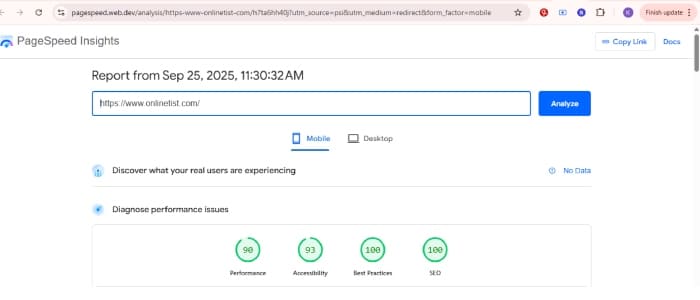

A website that ranks on Google’s first page and converts visitors into clients relies on more than just keywords or aesthetics; its success is determined by the architecture beneath the surface.
A high-performing website is built on a foundation of solid engineering, intuitive user experience (UX), and uncompromising accessibility. It is an asset engineered to earn the trust of both Google’s algorithm and the people who use it. This guide breaks down that architecture, detailing the essential principles for website development that is not only live but is technically prepared for advanced off-page strategies and achieving high search rankings.
Before you can think about colors or content, you need strong bones. A proper foundation is the first step in any good website planning process and ensures your site is fast, reliable, and ready to scale.
A visitor should know exactly what to do within seconds of landing on your page. This isn’t about luck; it’s about intentional design that guides the eye. After my review of over 1,000 Dubai websites, I found this was the single biggest area for improvement.
Building an accessible website isn’t just a compliance issue—it’s a powerful SEO strategy. When you make your site easier for screen readers, you’re also making it crystal clear for search engine bots.
/* Example: Enforcing Strong Text Contrast */
Example css:.my-home-wrapper main p,
.my-about-wrapper p,
.my-ai-wrapper main p,
.my-portfolio-wrapper main p {
    color: #1a202c;
}
This ensures strong text color contrast for body text across pages.

### Underlined Links for Clarity
Example css:.my-home-wrapper p a,
.my-about-wrapper p a,
.my-ai-wrapper p a,
.my-portfolio-wrapper p a {
    text-decoration: underline;
    text-decoration-thickness: 1.5px;
    text-underline-offset: 3px;
}
This guarantees all links are visually distinguishable for all users. You can even add a subtle touch of branding:codeCSS
/* Example: Branded Underline Color */
Example css.my-home-wrapper p a {
  text-decoration-color: rgba(67, 135, 246, 0.7);
}
This applies a semi-transparent custom underline color while keeping accessibility intact.
A slow or insecure website is the fastest way to lose a customer. Implementing modern security headers isn’t just a technical task; it’s a fundamental trust signal and a core part of future-proof web development.
This is where you ensure the technical foundation is perfectly aligned for search engine crawlers.
Include this in your <head>:codeHtml
<meta name="viewport" content="width=device-width, initial-scale=1">Provide structured data to give Google explicit context about your business.codeHtml
<script type="application/ld+json">
{
  "@context": "https://schema.org",
  "@graph": [
    {
      "@type": "ProfessionalService",
      "name": "Onlinetist",
      "alternateName": "WEB DEVELOPER IN DUBAI",
      "description": "Kaleemullah Naik is a full-stack web developer in Dubai...",
      "url": "https://onlinetist.com/",
      "address": {
        "@type": "PostalAddress",
        "addressLocality": "Dubai",
        "addressCountry": "AE"
      }
    }
  ]
}
</script>This is about the content itself and how it’s structured on the page.
An effective internal linking strategy involves connecting related content within your website using descriptive anchor text. This creates a logical pathway for both users and search engine crawlers. For instance, a sentence in a blog post discussing “the benefits of responsive design” could link the phrase “mobile-first web development” to a dedicated service page on that topic. This strengthens the topical authority of the linked page and helps users discover relevant information seamlessly.
Speed is everything. As a professional web designer, I see slow websites as the number one conversion killer.
Automated tools are great, but the final quality check must be done by a human.
A website that dominates search results and consistently wins clients is not an accident. It’s an engineered system where every element—from the code architecture to the button color—works in harmony. If you:
…your site will not only land on Google’s first page — it will convert visitors into customers.
Q: Can I do all of this on WordPress?
A: Yes, but you’ll need to use the right theme, plugins, and sometimes custom code to achieve a truly high-performance result.
Q: Do I need to know code to apply this?
A: Not for everything. Some parts require dev help (e.g., CSP, schema), but many things like alt text, headings, and internal linking can be done via your CMS.
Q: How often should I optimize for speed and accessibility?
A: I recommend a full audit quarterly, or after any major website update.
Q: Will schema instantly improve my rankings?
A: No — it improves clarity for search engines, which can help rankings and click-through rates (CTR) indirectly over time.